Agentic Browsing: why did the form fail after passing Lighthouse?
Agentic Browsing means an AI agent operating a browser to complete a task for a user, such as submitting a form or booking. It is also an experimental Google Lighthouse category (introduced in 13.3, requiring Chrome 150+) that checks the accessibility tree, CLS, llms.txt and WebMCP, reporting a pass ratio rather than a 0 to 100 score.
- The original failure:
␠SEO␠(␠ denotes one space) passed browser length validation but was rejected after the server trimmed spaces. The form gave no useful correction, while Lighthouse still showed 2/2. - The homepage scored 2/2 in Lighthouse and 20/100 in a September 10 Cloudflare scan; on October 12 the homepage and article scored 3/3 after llms.txt went live. Neither Lighthouse run submitted a form.
- Matching client and server validation, an associated field error and restored focus fixed the recovery path; one corrected inquiry reached the local test receiver.
- Readiness scans, deterministic browser tests and agent attempts answer different questions. Verify the destination record, not only the click or success message.
- One failed attempt and one successful retest are case observations, not a generalizable agent completion rate.
The original finding: the audit passed, the form failed
In the local test on 10 September 2026, a field with minlength="5" accepted ␠SEO␠ (␠ means one space: three letters and two spaces) because the browser counted the spaces. The server trimmed them, rejected the inquiry and showed a generic failure message without correction guidance. Codex ran the test on a local copy with a test receiver.
Lighthouse Agentic Browsing · ExperimentalDocumentation and test details
- Feature
- Lighthouse Agentic Browsing
- Vendor
- Documented status
- Experimental
- Version in the recorded test
- Lighthouse 13.4.1 / Chrome 152
- Recorded test date
- Follow-up audit
- · Lighthouse 13.4.1 / Chrome 154 · 3/3 · Public homepage and article; llms.txt check became applicable. No form was submitted.
- Documentation last checked
- Official documentation
- Lighthouse Agentic Browsing ↗
Chrome documentation was checked on 12 October 2026. The historical 10 September Lighthouse run used Chrome 152. An independent follow-up on the two live public pages on 12 October used Lighthouse 13.4.1 and Chrome 154. The local form experiment was not repeated by Lighthouse.
- : Added a card separating the documented feature status from the historical test version.
- : Added the 3/3 follow-up Lighthouse results after /llms.txt went live, kept the September 2/2 record, distinguished scans from task completion and repaired the archived scanner citation. On 12 October the same article was also restructured around the form defect, test layers, verified completion and Chrome sources.
Transcript
- Agentic Browsing: An audit score is not the finish line
- Homepage · 10 Sep 2026: Lighthouse: 2/2 Cloudflare: 20/100
- What can we learn?: Same site. Different checks.
- How do we verify success?: Inspect the result in the destination system.
- Task verification: The right record. Correct content and count.
- Full article: nirlevi.com
12 October 2026 update: After llms.txt was published, Lighthouse 13.4.1 reported 3/3 for the homepage and article. The October reports and September local case remain available below with their respective dates and conditions.
How this was tested: On 10 September 2026, Codex ran the controlled experiment on a local build using Chrome 152, fictitious inputs and a test receiver instead of email. The case was chosen after reading the code. The live-page scan and local case are documented separately; see the full form case and the working checklist.
Where to start testing a browser agent on your site
I recommend starting with one task whose outcome you can inspect. For an inquiry form, check that visitors can recover from an error and that a valid inquiry reaches the receiving system.
I recommend starting with the action that matters most to your customer. For SaaS, that might be trial registration; for services, requesting a quote.
Define the finish line first. “The agent clicked submit” records an action. “The receiving system contains the correct inquiry” defines a checkable result.
The work also helps human visitors. An unclear field or unhelpful error message makes recovery harder for anyone using the form.
| Website | First task to test | Verify |
|---|---|---|
| SaaS | Trial registration or demo request | An account or request with the right details |
| Services | Invalid inquiry input followed by correction | One accepted inquiry after recovery |
| Commerce | Choose options, use the cart and place a test order | Correct item, price and quantity |
| Content and documentation | Find an answer or download a document | The right document and supported answer |
Lighthouse: 2/2 in September, 3/3 in October; Cloudflare 20/100
The public homepage at https://nirlevi.com/ was also audited directly. Agentic Browsing returned 2/2, with CLS measuring 0.
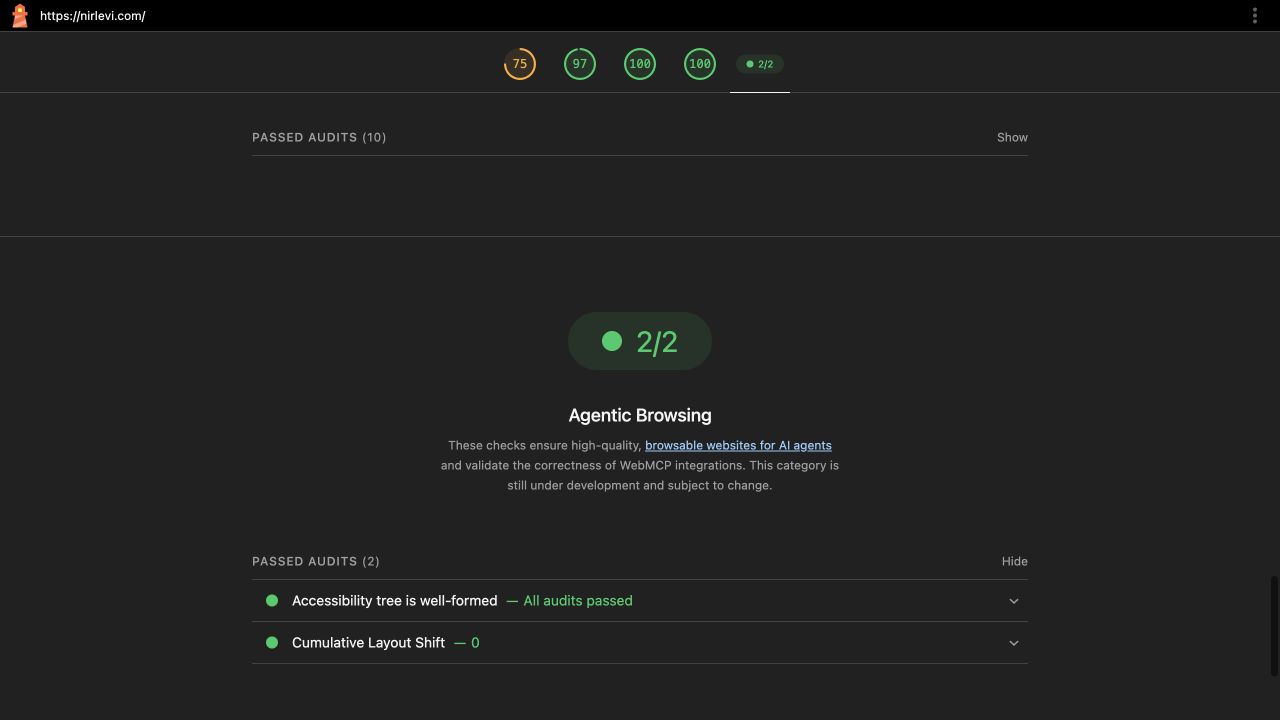
The accessibility tree passed. WebMCP checks and llms.txt were N/A. Inspect the complete report and raw JSON.
Other categories returned Performance 75, Accessibility 97, Best Practices 100 and SEO 100. These are homepage lab results, not measurements of this article.
Follow-up, 12 October 2026: The new Lighthouse 13.4.1 record shows 3/3 for both the homepage and this article. The accessibility-tree audit still passed and CLS remained 0. Because /llms.txt is now published, its audit changed from N/A to a pass. The three WebMCP checks remained N/A.
| Date and page | Lighthouse | llms.txt | What the result establishes |
|---|---|---|---|
| 10 Sep 2026 · homepage | 2/2 | N/A (file absent) | Accessibility tree and CLS passed; no form submission |
| 12 Oct 2026 · homepage | 3/3 | Pass | A further audit became applicable; task completion untested |
| 12 Oct 2026 · article | 3/3 | Pass | Public-page readiness check, not an inquiry test |
The move from 2/2 to 3/3 changed the denominator: a new check became applicable after publishing the file. The first two checks were still good.
The 12 October 2026 follow-up reports are available for inspection: homepage HTML and JSON; article HTML and JSON. These were collected using Lighthouse 13.4.1 and Chrome 154 against the live pages; they are not form-submission tests.
The same URL received 20/100, at Basic Web Presence, in the Cloudflare Agent Readiness scan. This is the archived 10 September result, not a new Cloudflare score from October.
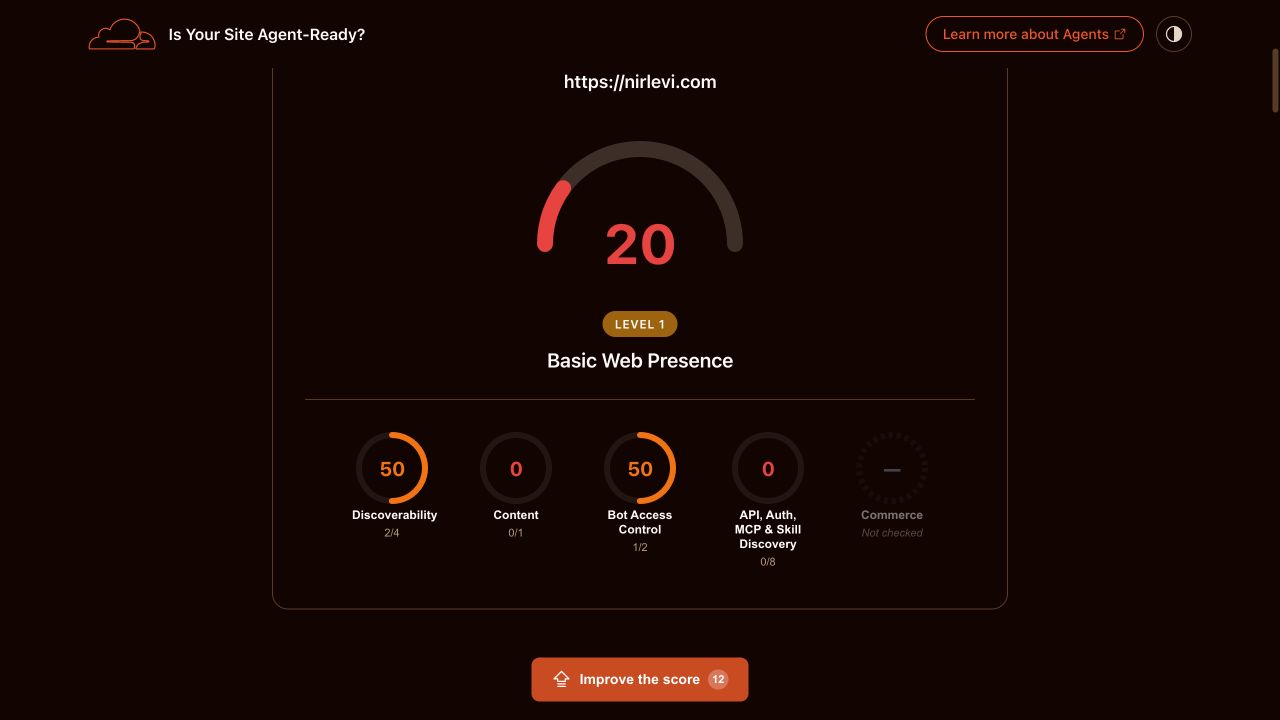
Passing checks by scan category
| Scan category | Result | What it means here |
|---|---|---|
| Discoverability | 2/4 | robots.txt and sitemap passed; dedicated discovery headers and DNS-AID were absent |
| Content | 0/1 | A Markdown request returned HTML |
| Bot access control | 1/2 | Wildcard rules applied; Content Signals were absent |
| API, auth, MCP and skill discovery | 0/8 | The tested discovery interfaces were not found |
| Commerce | Not checked | This is neither a passing nor failing payment test |
I would not turn the tool’s 12 recommendations into an automatic development backlog. First decide which capabilities this site should provide.
An API catalog adds little without a public API. A useful form error, on the other hand, immediately helps a visitor recover.
The scan observation record preserves the displayed results. The local recovery experiment follows, with reproducible input and a verified repair.
The case: rejected input with no useful explanation
The inquiry form on this site had a small mismatch between browser and server validation. The input was ␠SEO␠: the symbol ␠ denotes one space before and after the three letters.
The browser required minlength="5", which that value satisfied. The server trimmed the outer spaces, counted three characters and rejected it.
Rejecting the request was correct. The defect was the explanation: the form said sending was unconfirmed and suggested retrying or emailing directly.
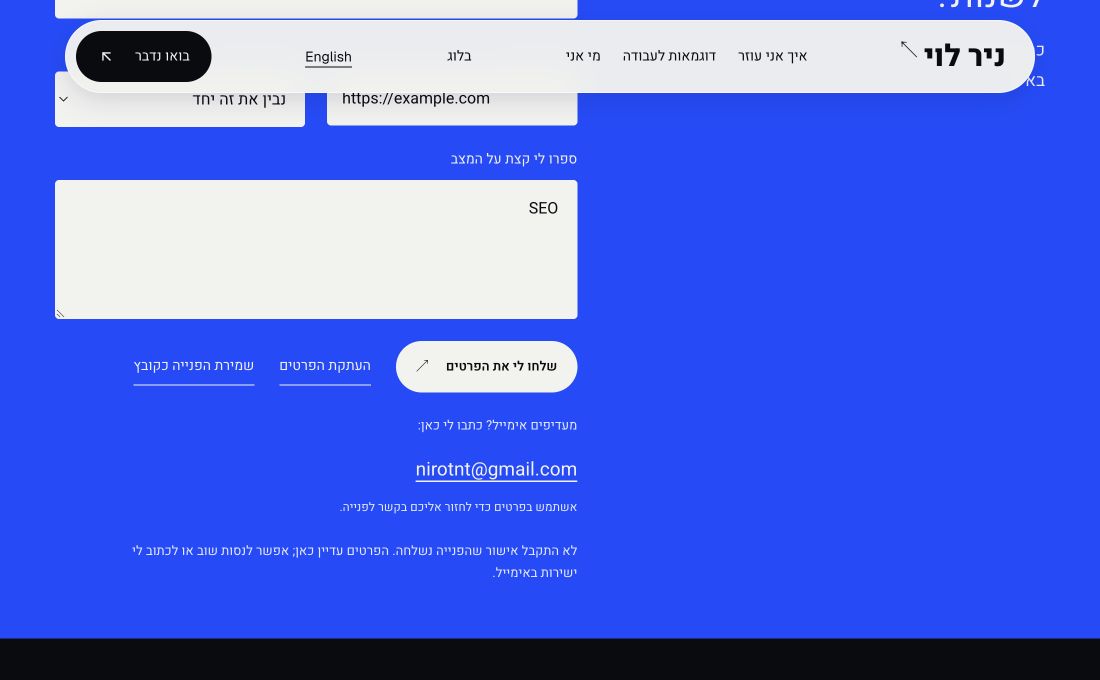
Retrying unchanged input cannot solve this. The visitor needs to know which field to correct, and an agent needs that same information.
This edge case was selected after inspecting the code. It exposes an existing recovery defect; it does not measure how often visitors encounter it.
Meanwhile, Lighthouse returned 2/2 on the same code: the accessibility tree passed and CLS measured 0. Four additional checks were N/A.
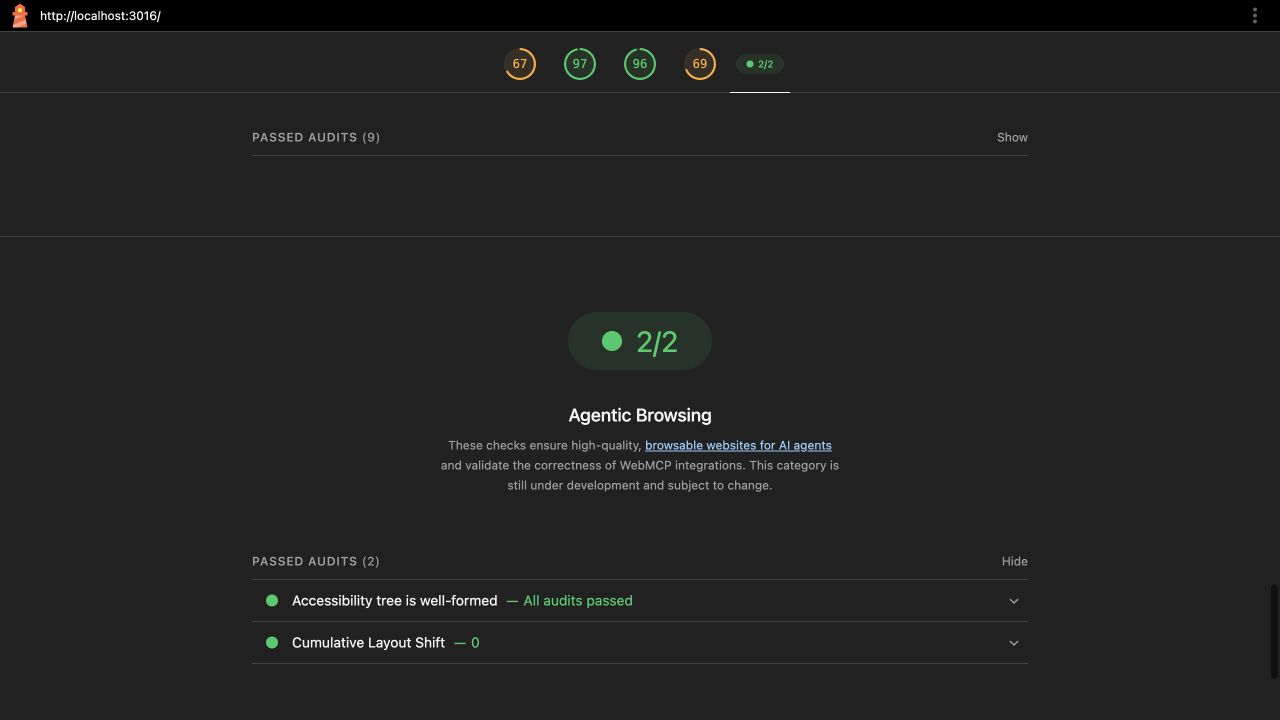
Inspect the complete baseline report or its raw JSON. Other categories remain visible as measured in the local environment.
The fix: identify the error and let the visitor recover
The fix keeps the server rule and applies it in the browser too. Short input stops at the field before submission.
- Browser and server share the same message validation function.
- The field receives
aria-invalidand an explanation connected witharia-describedby. - Focus returns to that field, while existing entries remain intact.
- The interface shows success only after the server confirms acceptance.
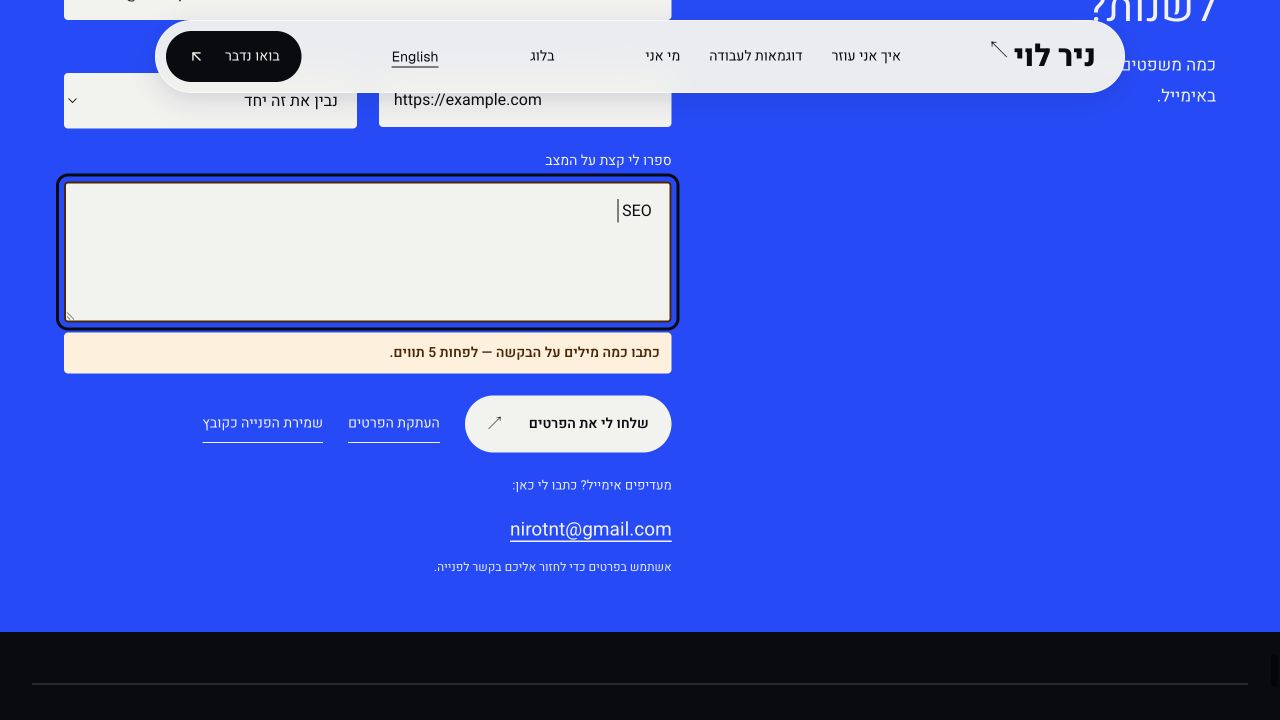
In the retest, invalid input stopped in the browser. Replacing it with “בדיקת נראות האתר בחיפוש” produced one accepted inquiry in the test receiver.
| Stage | Observation | What it establishes |
|---|---|---|
| Before the fix | 5 browser characters, 3 after trimming; generic sending error | No useful recovery instruction |
| After the fix, identical input | Associated field error, focus and 0 POST requests | Invalid input can be corrected before submission |
| After correcting the message | One POST, HTTP 200 and one record with matching content | The local receiver accepted the inquiry |
The completion evidence is the accepted record, alongside the request log. A success message alone would not establish that.
The follow-up report stayed at 2/2. What changed was the ability to correct the form and continue.
I would keep this case in the form’s regression checks. It exercises a recovery path that the initial page audit never entered.
Measure verified completion, not just a passing audit
An operational completion measure is the number of tasks verified in the destination system divided by the number of documented attempts. In the controlled September 10 case, the invalid input yielded 0 accepted inquiries from one attempt. After the correction, one corrected inquiry was accepted from one attempt in the local receiver. Each is a single case observation, not an estimated success rate for browser agents.
| Testing layer | What it can establish | Evidence from this case |
|---|---|---|
| Lighthouse readiness | Page structure, layout stability, llms.txt and applicable WebMCP checks | Measured: 2/2 in September; 3/3 on live public pages in October, without submitting the form |
| Deterministic browser test (such as Playwright) | A defined input/error/recovery/submit flow behaves consistently | Recommended regression layer; no separate historical Playwright run is claimed here |
| Browser-agent attempt + result verification | The agent completed the steps and the destination record matches the request | Codex-assisted controlled local test accepted one corrected record; repeat across tasks and agents to estimate reliability |
To estimate a meaningful completion rate, define tasks, conditions, model/browser versions and repeated attempts first. Count only outcomes checked at their destination. Chrome's evals guidance explains why AI-driven outcomes need repetition; the accepted test inquiry here supports only this case.
The audit checklist: concrete fixes and the next test
Lighthouse helps identify technical obstacles. Open the finding, repair its cause, then exercise the task that depends on it.
Chrome’s documentation describes an experimental category requiring Chrome 150 or later. Its fraction counts passing checks; it is not a weighted 0 to 100 score.
1. Accessibility tree: names, roles and fields
Lighthouse 13.4.1 groups 33 accessibility rules into its tree check. These include button names, field labels and valid ARIA roles.
For an unnamed control, use a real button with clear text. An icon-only button needs an accessible name that explains its action.
Connect a label with matching for and id values, or wrap the field inside label. Both approaches are valid.
HTML example: a field in an error state, with a connected explanation
<label for="request">What should we review?</label>
<textarea id="request" name="goal"
  aria-invalid="true" aria-describedby="request-error"></textarea>
<p id="request-error">Write a few words about your request.</p>
Application code must clear the error state after correction and manage focus where needed. This example shows the error state only.
Passing does not establish: that the visitor can correct invalid input or that the form saves it. Trigger an error and test recovery.
2. CLS: keep the action in place
CLS measures unexpected layout shifts. An image without reserved space or a late-loading banner can move a button during interaction.
Set image dimensions or aspect-ratio, and reserve space for delayed content. These are established CLS fixes.
Passing does not establish: stability after selecting a plan, loading a price or displaying an error. Exercise those states too.
3. llms.txt: distinguish missing, malformed and irrelevant
The file is optional. Chrome’s documentation says a 404 is N/A, while a server failure is flagged.
For a returned file, version 13.4.1’s implementation also checks for an H1, a Markdown link and at least 50 characters.
What changed here: By 12 October 2026, nirlevi.com/llms.txt was live and passed the Lighthouse 13.4.1 checks (H1, Markdown link and at least 50 characters). The public-page audit then reported 3/3 rather than 2/2, without measuring task completion.
Basic structure, if you choose to maintain this file
# Example company

Product documentation and support for customers.

## Documentation
- [Getting started](https://example.com/docs): Setup instructions.
If you provide it, check both the server response and content. Creating a file simply to replace N/A with a pass is a weak priority.
Passing does not establish: that an agent read it, relied on it or completed a task. Test the system you intend to support.
4. WebMCP: registration, form coverage and schema validity
WebMCP exposes structured actions to a supporting agent. Availability search, for example, can accept defined inputs and return a clear result.
| Check | Inspect and repair | Still exercise |
|---|---|---|
| Tool registration | Registration timing; a name and description that explain the action | The supporting consumer discovers and selects the right tool |
| Form coverage | The intended form is correctly exposed through the declarative implementation | Inputs map to the correct business fields |
| Schema validity | Input types and required fields match the action’s contract | Invalid input has a useful error; valid output is saved |
Current JavaScript registration uses document.modelContext.registerTool. Feature-detect support and follow the current API documentation.
For HTML integration, see the declarative API. Define the action before adding tool names to forms.
WebMCP audits require the relevant trial setup. In the tested release they have zero weight in the fraction; this local report marked them N/A.
Passing does not establish: authorization, acceptance by the destination system or duplicate prevention. Test each in the action you expose.
Agent Readiness vs Agentic Browsing vs a task test
To choose the next check, I would start with what remains unknown: can the agent access the page, discover the capability it needs, or complete the task? Each question calls for a different test.
| Question | Lighthouse Agentic Browsing | Cloudflare Agent Readiness | Task test |
|---|---|---|---|
| 12 Oct 2026 follow-up | 3/3 on the homepage and article after llms.txt was published | Not rescanned; 20/100 is from 10 September | No inquiry was attempted in the Lighthouse rerun |
| Unit tested | A page in the chosen audit mode | A URL and discovery resources | A predefined journey and outcome |
| Main purpose | Structure, stability and WebMCP integration | Discovery mechanisms and protocol support | Whether the user achieves the intended result |
| Accessibility tree and CLS | Direct audits | Not the measures in its scan summary | Observe their effect during interaction |
| robots.txt and sitemap | Outside the Agentic category | Discovery checks | Check only if relevant to the task |
| Markdown | llms.txt checking is not format negotiation | Tests Accept: text/markdown responses | Check the content and output the task requires |
| WebMCP | Registration, coverage and schema checks under supported conditions | Capability discovery | Invoke an action with a supporting consumer |
| Errors and retries | A navigation audit does not submit the form | A standards scan does not complete an inquiry | Correct input; check acceptance and duplicates |
| Results recorded on September 10, 2026 | 2/2 on the live homepage | 20/100 in the live scan | Local defect fixed; one inquiry accepted |
| Closure condition | Technical finding resolved | Desired capability is available and discoverable | Correct output exists in the destination system |
The results complement each other. A low Cloudflare score does not invalidate the passing Lighthouse checks: the tools examine different capabilities. Use the table to choose the check that answers your question.
How to run a test you can repeat
Open the exact page in Chrome, enter DevTools and select Lighthouse. Enable Agentic Browsing, run the audit and save the report.
If the category is absent, check your Chrome and Lighthouse versions. The CLI is another option, used for this example.
Export JSON and HTML; replace the URL with your page
npx lighthouse@13.4.1 https://example.com/ \
  --only-categories=agentic-browsing \
  --output=json --output=html --output-path=./audit
Record the URL, date, versions, authentication state and emulated device. Otherwise, changed conditions can be mistaken for the effect of a repair.
- Submit valid input and inspect the record in the receiving system.
- Enter invalid input: is the required correction clear, and are the other entries retained?
- Correct and resubmit: does the exact requested result exist?
- Test a retry after a delay or disconnection, checking for duplicate outcomes.
- Also test dropdowns/date pickers, slow responses and network interruptions; ensure retries don't create duplicate outcomes.
- If a CAPTCHA or human-verification step blocks the run, record it as BLOCKED with the reason, not as a confirmed agent task failure.
- For WebMCP actions, inspect tool exposure, input and results in Chrome DevTools for agents and repeat the evaluation.
Use a test environment or coordinated test data for commercial forms. A booking test should produce a test booking without an accidental charge.
Chrome’s agent-ready toolkit can help choose which scenarios to run after each change and where to include an agent.
Is the defect in the website or the testing tool?
An agent failure starts an investigation. First check whether the tool supports the action and whether its instruction matched the interface.
| Failure | Inspect | Close when |
|---|---|---|
| Field not found | Accessible name, label, loading state and the tool instruction | The correct field is identified |
| Submission rejected | Server response and the visible field explanation | Correction and resubmission preserve other entries |
| Success shown without an outcome | Server response and destination record | The correct content exists in the receiving system |
| A retry creates two actions | Submission locking and server-side duplicate prevention | Retrying does not create a duplicate result |
| Agent cannot access a download | Tool download support and whether the file actually exists | A missing file is distinguished from a tool access limitation |
The form mismatch appeared in both the code and the interface. That supports a site fix. A failed tool instruction alone would not.
How does this relate to GEO, and what comes first?
Agentic Browsing concerns completing actions. GEO concerns visibility in AI answers. They address different goals, even when they involve the same website.
Google Search says its AI features need no special files and that it ignores llms.txt. An audit pass promises neither a mention nor a ranking.
My recommended order: choose a valuable action, fix its obstacles, then decide whether WebMCP adds something useful to that path.
Use the test template to hand development an actionable finding: input, defect, repair and acceptance criteria. For answer visibility, use the AI measurement guide.
Frequently asked questions
How do you verify that the agent actually completed the task?
Inspect the destination record, test booking or downloaded file, including its content and count. Then check that the agent received a matching confirmation. A screenshot of a click or success message cannot replace the actual outcome.
How did Lighthouse reach 3/3 when Cloudflare showed 20/100?
The tools measure different things, and the dates differ. On 10 September Lighthouse reported 2/2 and Cloudflare showed 20/100. On 12 October Lighthouse reported 3/3 after llms.txt was added; the Cloudflare score shown here is still the September observation. Neither scan proves a successful form submission, which was investigated separately in a local test.
Does an agent need WebMCP to use a website?
No. A browser-capable agent can operate ordinary fields, buttons and links. WebMCP adds a structured action interface for supporting consumers. Implement it when you have a defined action and a benefit you can test.
Does a content website need task testing?
Yes, when readers need to find a document, download a file or locate specific information. For a reading-only site, define a retrieval and comprehension task. Do not invent a checkout or public API just to satisfy a score.
How should you test login or payment flows?
Use a test account with defined permissions and a payment sandbox. Record where human participation is required. A CAPTCHA or confirmation step is not automatically a defect because the agent must stop and hand control back.
Should you fix every failed Agent Readiness check?
No. Start with the user’s need and the capabilities the site actually offers. An API catalog adds little when there is no public API. Content-use preferences belong to the site owner; do not copy them merely to improve a score.
When should you repeat the test?
After changing forms, navigation, input validation, consent banners or components that move the layout. Repeat the same scenario against the same acceptance criteria. Browser and agent updates also justify retesting important journeys.
Who should own the findings?
Product or the site owner defines success; developers repair behavior and validation; QA checks completion and recovery. SEO helps select journeys tied to customer demand. Assign an owner and a clear closure condition to each finding.
How do you test whether your site works for AI browser agents?
Choose a real task, run a Lighthouse audit and a deterministic browser check with valid and invalid inputs, then attempt it with an agent. Verify the actual destination record, document BLOCKED states and repeat under known conditions. Lighthouse alone cannot confirm task completion.
Sources & further reading
- Chrome: Agentic Browsing scoring ↗
- Chrome: llms.txt audit ↗
- Google Search: AI optimisation guidance ↗
- Chrome: WebMCP imperative API ↗
- Chrome: WebMCP declarative API ↗
- Cloudflare: Agent Readiness ↗
- Chrome: Run Lighthouse and export reports ↗
- web.dev: Optimise Cumulative Layout Shift ↗
- MDN: HTML label element ↗
- Lighthouse 13.4.1: accessibility tree implementation ↗
- Lighthouse 13.4.1: llms.txt implementation ↗
- MDN: minlength constraint ↗
- Cloudflare Agent Readiness scanner (September 10 capture archived in article) ↗
- Lighthouse 13.4.1: homepage recheck (12 October 2026, JSON) ↗
- Lighthouse 13.4.1: article recheck (12 October 2026, JSON) ↗
- Chrome: Developer toolkit for agent-ready websites ↗
- Chrome: Test WebMCP with evals ↗
- Chrome: Debug WebMCP tools with agents ↗
- Chrome: WebMCP best practices ↗
- DebugBear: Lighthouse 13.3 Agentic Browsing introduction ↗